Security Responsibilities: What Does a Managed VPS Provider Cover That Unmanaged Leaves to You?
Choosing a VPS is not only about CPU, RAM, storage, or bandwidth. Server security is also an important part of the decision. A VPS gives you more control than shared hosting, but that control also comes with responsibilities.
The biggest difference becomes clear when comparing a managed VPS with an unmanaged VPS. In a managed environment, the hosting provider typically handles many routine server-management and security tasks. With an unmanaged VPS, much of that work becomes the customer’s responsibility.
Understanding these differences can help you choose the right hosting model and avoid security gaps.
What Is the Difference Between Managed and Unmanaged VPS?
A managed VPS usually includes technical assistance with server administration, updates, monitoring, configuration, and other maintenance tasks. The exact level of management depends on the hosting provider and plan.
An unmanaged VPS generally gives you greater administrative control, but you are responsible for maintaining the server yourself. This can include operating system updates, firewall configuration, security hardening, backups, and troubleshooting.
For businesses that do not have server administration experience, the difference between managed vs unmanaged VPS can have a significant impact on security and maintenance workload.
Who Handles Security Updates?
Operating system and software updates are among the most basic server security requirements.
Security patches are released to address vulnerabilities that could otherwise be exploited. On a managed VPS, the provider may monitor and apply relevant operating system updates as part of its management service.
On an unmanaged VPS, the customer normally needs to:
- Monitor available security updates
- Apply operating system patches
- Update server software
- Check for outdated packages
- Test important updates when necessary
- Resolve problems caused by incompatible updates
Delaying critical updates can leave known vulnerabilities exposed, so an unmanaged server requires regular administrative attention.
Firewall Configuration
A firewall controls which network connections are allowed to reach your server. A properly configured firewall can reduce unnecessary exposure by limiting access to required ports and services.
With a managed VPS, the hosting provider may help configure firewall rules and secure commonly used services. Depending on the provider, firewall management may be included as part of the managed service.
With an unmanaged VPS, you are generally responsible for the firewall configuration.
This can involve:
- Identifying which ports are actually required.
- Blocking unnecessary services.
- Restricting administrative access.
- Allowing only required network traffic.
- Reviewing firewall rules periodically.
A basic Linux firewall setup should be treated as part of the server’s security configuration rather than something that can be configured once and forgotten.
Server Hardening
Server hardening means reducing unnecessary security risks through configuration changes.
Examples include:
- Disabling unused services
- Restricting remote administrative access
- Using SSH keys instead of relying only on passwords
- Disabling unnecessary login methods
- Configuring secure file permissions
- Removing software that is no longer required
- Limiting access to administrative services
On a managed VPS, some of these tasks may be handled or assisted by the hosting provider. With an unmanaged VPS, the server administrator generally needs to perform them.
Malware and Suspicious Activity Monitoring
Security is not limited to installing patches. Servers should also be monitored for unusual activity.
Depending on the service, managed hosting may include server monitoring, malware scanning, security alerts, or assistance with investigating suspicious activity.
However, customers should not automatically assume that a managed VPS includes unlimited security protection.
A hosting plan may provide server administration without providing a complete cybersecurity service. Before purchasing, check exactly what monitoring and security assistance are included.
Backups and Recovery
Backups are another important responsibility to clarify.
A managed VPS provider may offer automated backups or help configure a backup system. Some providers also provide assistance with restoring files, databases, or server configurations.
On an unmanaged VPS, you may need to create and maintain your own backup strategy.
A useful backup plan should consider:
- How frequently backups are created
- Where backups are stored
- How long backups are retained
- Whether databases are included
- Whether backups are stored separately from the VPS
- How quickly the data can be restored
A backup is only useful if it can actually be restored when needed.
What Does a Managed VPS Provider Usually Cover?
Managed VPS services commonly focus on reducing the amount of server administration required from the customer.
Depending on the provider and plan, this can include:
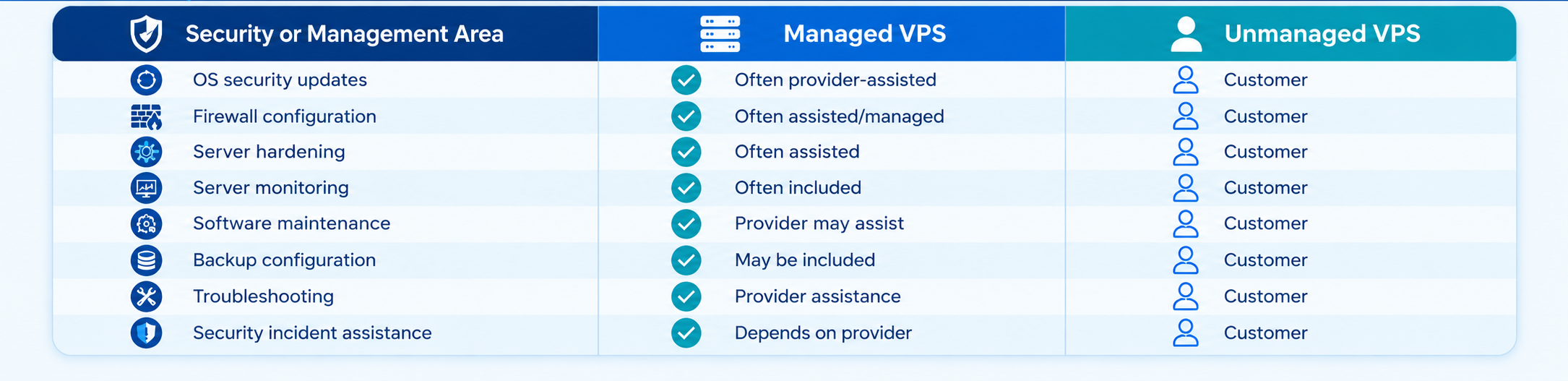
The exact responsibilities vary between hosting companies, so the service agreement should always be checked before making assumptions.
What Does Unmanaged VPS Security Require From You?
An unmanaged VPS is not automatically insecure. It simply gives you more responsibility for maintaining the server.
If you choose an unmanaged VPS, your team should have a clear process for:
- Applying operating system and software patches
- Managing firewall and access-control rules
- Monitoring suspicious activity and failed login attempts
- Maintaining reliable, tested backups
- Updating CMS platforms, plugins, frameworks, and databases
- Responding quickly to security incidents
This approach works well when you have the technical knowledge and time to manage server security consistently. If those resources are not available, a managed VPS can reduce the amount of routine administration your team needs to handle.
Does Managed VPS Mean the Provider Guarantees Security?
Not necessarily.
The phrase “managed” should not be interpreted as a complete web host security guarantee.
A managed VPS provider can help with server administration and security-related maintenance, but application-level security may still remain your responsibility.
For example, if a WordPress plugin contains a vulnerability, the customer may still need to update or remove that plugin. Similarly, weak application passwords, insecure application code, or compromised user accounts may require action at the application level.
Before choosing a managed plan, review the provider’s service scope and confirm which security tasks are actually included.
How to Choose Between Managed and Unmanaged VPS
An unmanaged VPS may be suitable for developers, system administrators, and businesses that already have the technical knowledge to maintain Linux servers.
A managed VPS can be more appropriate when you want to reduce the workload associated with server administration.
Consider a managed VPS if:
- You do not have a dedicated server administrator.
- You want help with routine server maintenance.
- You prefer provider assistance with configuration issues.
- You want to spend more time managing your application instead of the server.
- Server downtime or security problems could significantly affect your business.
An unmanaged VPS may make sense if:
- You have Linux administration experience.
- Your team can manage security updates.
- You need full control over server configuration.
- You already have monitoring and backup processes.
- You are comfortable troubleshooting server-level issues.
Security Depends on Clear Responsibilities
The key difference between managed and unmanaged VPS hosting is not simply the level of security. It is who is responsible for maintaining that security.
A managed provider may handle infrastructure-level tasks such as updates, firewall configuration, monitoring, and server maintenance, depending on the plan. The customer may still be responsible for applications, plugins, passwords, website code, and user access.
With an unmanaged VPS, most server-level security work falls directly on the customer or their technical team.
Before deploying a production website or application, identify which tasks your hosting provider handles and which ones you must manage yourself. A clear division of responsibility helps prevent security tasks from being overlooked and makes it easier to choose a VPS plan that matches your technical resources.
Key Security Considerations
