Redundancy Comparison: How Cloud VPS Prevents Single Points of Hardware Failure
When a website depends on a single physical server, one hardware failure can cause unexpected downtime. A failed motherboard, disk, network interface, or power component can make the VPS hosted on that machine unavailable until the problem is resolved.
Cloud VPS infrastructure is designed to reduce this dependency through technologies such as node clustering, shared storage, disk replication, and automated recovery.
Understanding these mechanisms is important when comparing cloud VPS vs traditional VPS, particularly for websites and applications where uptime directly affects users and business operations.
What Is a Single Point of Hardware Failure?
A single point of failure is a component whose failure can interrupt an entire service.
For example, a basic VPS setup may look like:
Website → VPS → Hypervisor → Physical Server → Local Storage
If the physical server fails, the VPS running on it may also become unavailable.
Common hardware-related failure points include:
- Physical server failure
- Local disk failure
- Motherboard or memory problems
- Network interface failure
- Power supply issues
- Hypervisor host failure
A traditional VPS can still be reliable, but its resilience depends on the provider’s underlying infrastructure. If the VPS is tied closely to one physical host, that host can become a major point of dependency.
How Cloud VPS Reduces Hardware Dependency
A properly designed cloud VPS environment can distribute workloads across multiple physical nodes.
Instead of depending on one server, a cloud platform may use a cluster such as:
Node A + Node B + Node C → Shared/Replicated Storage
If Node A experiences a hardware failure, the infrastructure can detect the problem and potentially restart the affected VPS on another healthy node.
This does not mean hardware failures disappear. Instead, the architecture is designed so that one physical failure does not automatically result in prolonged service interruption.
This approach is particularly useful for businesses looking for high availability VPS hosting.
The Role of Node Clustering
Node clustering allows multiple physical servers to work together as part of the same virtualization environment.
Consider a VPS normally running on Node A. If Node A suddenly becomes unavailable, the cluster can identify the failed node and initiate recovery on another available node, depending on the provider’s configuration.
A simplified recovery process looks like this:
- The physical node stops responding.
- The cluster detects the failure.
- The affected VPS is identified.
- A healthy node is selected.
- The VPS is restarted or recovered.
- Network and storage access are restored.
This process is known as node failure recovery.
The exact recovery time depends on the provider’s technology and configuration, so cloud hosting should not automatically be considered “zero downtime.”
Why SAN Storage Matters
Compute redundancy alone is not enough.
Suppose a VPS is running on Node A, but its data exists only on a local disk inside Node A. If Node A fails, another server may have enough CPU and RAM to run the VPS, but it may not have access to the latest data.
This is where shared storage such as a SAN (Storage Area Network) can help.
A SAN separates storage from the individual compute node:
VPS → Compute Node → SAN Storage
If the original compute node fails, another node can potentially access the same storage and recover the VPS.
This reduces the dependency between the virtual machine and one particular physical server.
Cloud Hosting Disk Replication
Another important redundancy mechanism is disk replication.
With cloud hosting disk replication, data can be maintained across multiple storage devices or systems. If one storage component fails, another copy may remain available.
For example:
VPS Data → Storage Copy A + Storage Copy B
If Copy A becomes unavailable, the infrastructure may continue using the replicated copy.
However, replication is not a replacement for backups.
Replication helps improve availability, while backups provide protection against issues such as accidental deletion, corrupted files, ransomware, or unwanted changes that may also be replicated.
A reliable hosting setup should use both where appropriate.
Cloud VPS vs Traditional VPS: Redundancy Comparison
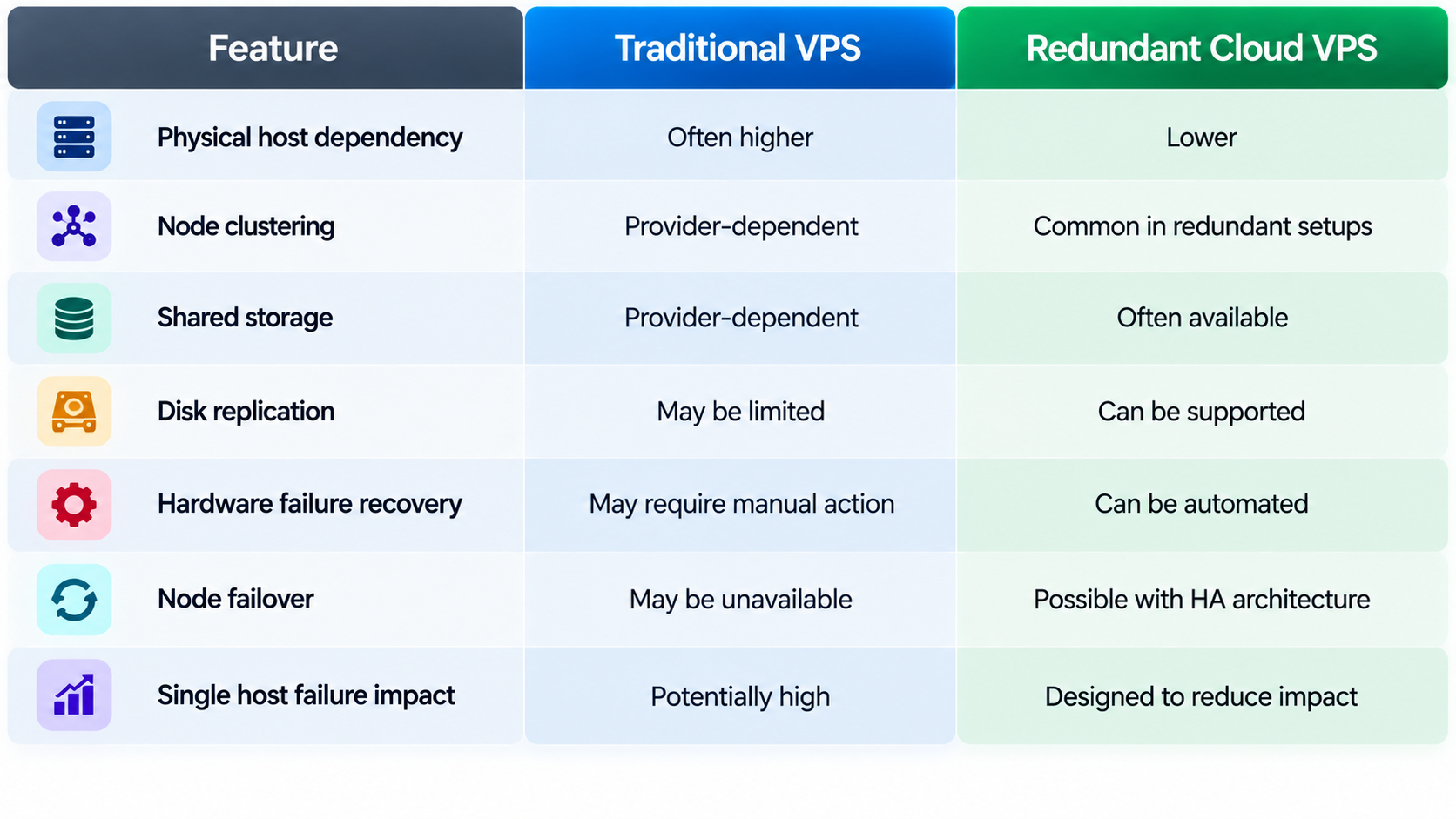
The important point is that the VPS label alone does not determine reliability. The provider’s actual infrastructure architecture matters.
High Availability Requires Multiple Layers
High availability is not created by clustering alone. A resilient environment needs redundancy across several infrastructure layers.
Compute
Multiple physical nodes reduce dependence on one server.
Storage
Shared or replicated storage helps prevent a single disk or storage system from becoming a critical failure point.
Network
Redundant network paths and equipment can reduce the impact of individual network component failures.
Power
Redundant power systems and backup infrastructure help protect against electrical problems.
Recovery
Monitoring and automated recovery systems can detect failures and restore affected workloads more quickly.
When these layers work together, the infrastructure becomes more resilient to individual hardware failures.
Does Cloud VPS Guarantee 100% Uptime?
No.
Cloud VPS redundancy can reduce the impact of certain hardware failures, but it cannot prevent every type of outage.
Downtime can still result from:
- Application errors
- Database failures
- DNS problems
- Software misconfiguration
- Security incidents
- Network-wide outages
- Human error
- Provider-wide infrastructure problems
For this reason, a good server high uptime guide should consider the complete application stack rather than only the physical server.
For example, a highly redundant web server can still experience downtime if its database is running on a single unprotected system.
How to Check a VPS Provider’s Redundancy
Before choosing a hosting provider, look beyond CPU, RAM, and storage specifications.
Ask:
Is the VPS tied to one physical node?This determines how strongly a hardware failure can affect the service.
Is storage local, shared, or replicated?This helps identify potential storage-related failure points.
What happens when a hypervisor fails?Check whether workloads can automatically restart on another node.
Does the platform use clustering?A properly configured cluster can provide better recovery options.
Are backups separate from replication?They should be treated as different layers of protection.
What is the provider’s recovery process?Understanding failover and recovery procedures gives a better picture of real-world availability.
Final Takeaway
The key advantage of a redundant cloud VPS is not simply virtualization. It is the redundant infrastructure behind the virtual machine.
Node clustering can reduce dependence on a single physical server, while SAN storage and disk replication can help keep data available when a compute node or storage component fails. Automated monitoring and recovery can further reduce the time required to restore affected workloads.
When evaluating cloud VPS vs traditional VPS, therefore, focus on the infrastructure rather than the product name alone. A well-designed cloud environment can remove or reduce several single points of hardware failure and provide a stronger foundation for applications that depend on high availability.
For business-critical websites and applications, understanding how compute, storage, networking, and recovery work together is one of the most important steps toward choosing reliable VPS infrastructure.
